 Skip to content

Sale Tickets
Manage access from one app.




From ticket sales to fast Access control
- Selling tickets to members and external visitors
- Open a unique ticket shop for each event
- Set tickets and prices by target audience
- Pay online via iDEAL
- Scan QR tickets directly at the entrance

Account manager

Everything for professional Ticket sales and admission
From a private members' activity to a large public event: set up tickets flexibly, process payments online, and easily check visitors in on arrival.
Internal and Public Events
Own ticket shop
Group tickets
Sales settings
Online payment
Own corporate identity
Digital tickets
QR access control
Make and sell every type ticket
Create different tickets per event with their own name, price, availability and terms. Sell regular tickets to external visitors or offer specific members and groups a discount or free entry.
You decide how many tickets are available, how many a person can order at most, and between which dates sales are open. You can also send free tickets directly to selected people.

A private Ticket shop per event
Once you make an event public, it will get its own online ticket shop. Visitors can view available tickets, fill in their details, and pay for their order directly via iDEAL.
Decided tickets for members or specific groups will only be shown to the correct people. This way, you can combine public sales and exclusive member benefits within the same event.
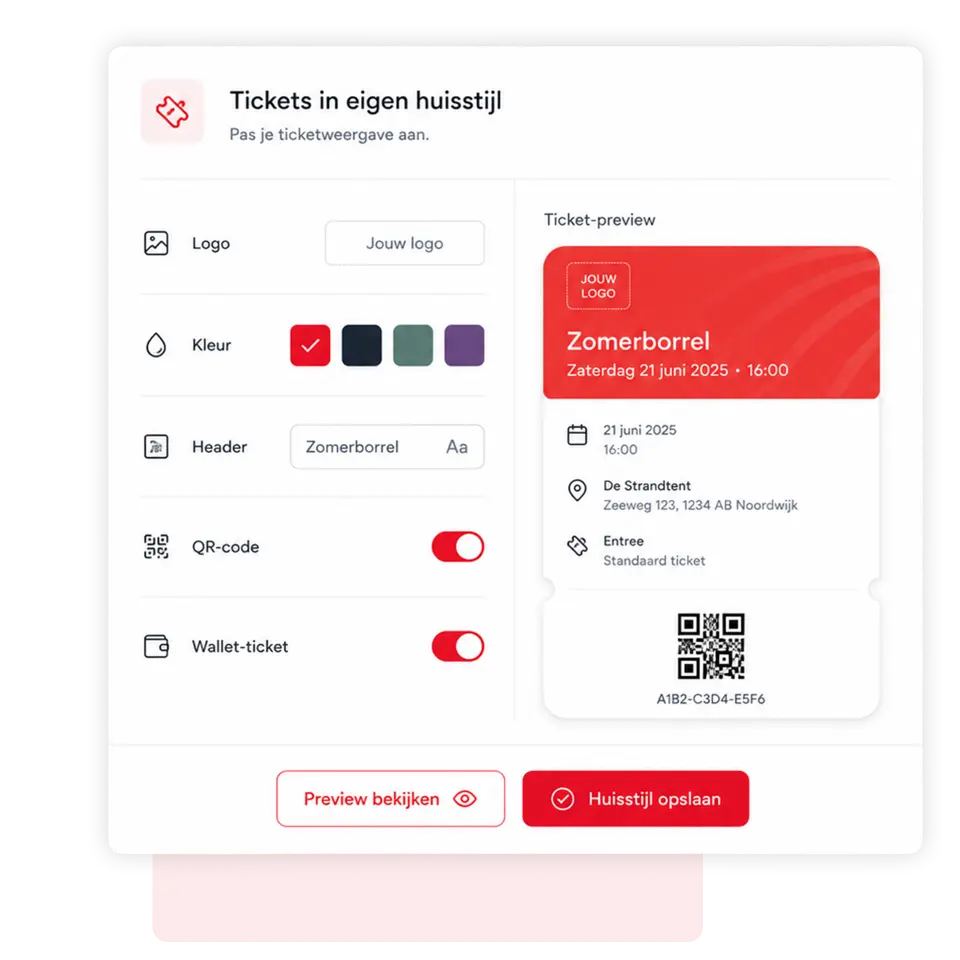
Tickets fully in your Corporate identity
Give every event a professional and recognisable appearance. Customise tickets with your own logo, colours, event information and other important details.
After ordering, visitors will automatically receive their digital ticket via email. The ticket can easily be saved on their phone and added to Apple Wallet, making it readily available at the entrance.

Flexible Ticketinstellingen
Precisely determine how and to whom tickets are sold. Set a minimum age, limit the number of tickets per order, and choose the start and end dates for sales.
You can also set different prices, discounts and free tickets for specific groups. This ensures that ticket sales are perfectly aligned with the event and your target audience.

Quickly inside with QR access control
Use 4Planning's built-in ticket scanner to check QR codes directly at the entrance. You'll immediately see if a ticket is valid and prevent the same ticket from being used multiple times.
Multiple employees can help with scanning, meaning visitors can enter more quickly. At the same time, you maintain an overview of the number of tickets sold, scanned, and still expected.

Met 4planning!
Create your own app entirely without obligation and start organising your organisation more efficiently straight away!
- 3-month free trial
- Cancelable monthly
Since 2016, 4planning has been helping organisations to manage members, processes and communication more effectively. Based on years of practical experience, we continue to improve and expand the platform.
Simply switch to 4planning. Import your existing member data and easily set up your app, so you can get back to work immediately without rebuilding everything manually.
We're happy to help!
Frequently Asked questions
Can I sell tickets to members and external visitors?
Can I give certain groups discounts or free tickets?
Which settings can I determine per ticket?
How do visitors receive their tickets?
Can visitors pay for tickets directly online?
How do I check tickets at the entrance?
With 4planning's built-in QR scanner, you can scan the ticket from a phone or a printed version. You'll immediately see if the ticket is valid and if it has been used before.
 Nederlands
  English (UK)
  Deutsch
  CRM & Customer Management
 Quotes & approval
 Projects & Planning
 Service & Maintenance
 Requests via website
 Materials and stock
 Customer communication
 Automation & AI
 Your company app
 Matches & results
 Bar staff rotas
 Referees' planning
 Agenda and attendance
 Internal communication
 Contributions & payments
 Tickets & admission
 Family accounts
 Sponsors
 Events & attendance
 Connections & Introductions