 Skip to content

Bouw aan waardevolle connections
within your business club.
Easily connect entrepreneurs, allow members to chat directly, and make it visible who is attending events. This fosters more interaction, collaboration, and engagement within the network.




Make networks Personal and simple
Members make direct contact with interesting entrepreneurs and easily invite connections to meetings. Everything is managed from one central business club app.
- Making connections with other members
- Chat directly within the app
- View companies and contacts
- See which connections come to an event
- Nodig de persoon persoonlijk uit.

Account manager
Everything for a stronger Business network
From an initial introduction to personal contact and participation in events: give members every opportunity to actively expand their network.
Members and companies discover
View connected entrepreneurs, businesses, sectors and contact details
Send connection requests
Personal network
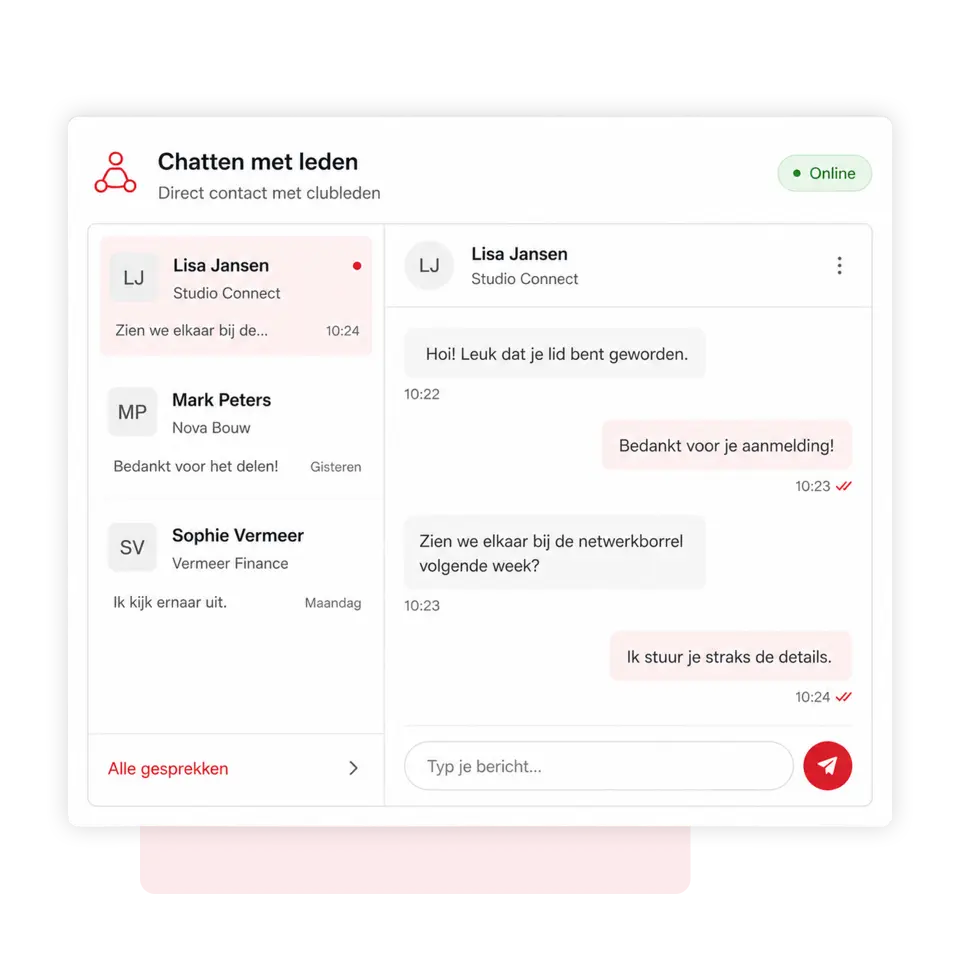
Chatting with members
Start a direct private conversation with other entrepreneurs
Networking at events
Invite introductions
Previous introductions

Make new connections
Members can view which entrepreneurs and businesses are affiliated with the business club within the app. Based on industry, expertise, or interest, they can easily send a connection request.
Once accepted, the entrepreneur is added to the personal network. This way, the app helps members make targeted contact outside of meetings and build valuable business relationships.

Chat directly with others members
Start a personal conversation directly from the member or company profile. This allows members to easily get acquainted, schedule an appointment, share knowledge or discuss a potential collaboration.
Contact details do not need to be requested from the board first, and conversations remain conveniently stored in the app. This lowers the barrier to making contact and increases interaction within the business club.

Invite easily a Introduce out
Members can invite a business acquaintance or potential new participant to suitable events. Enter the invitee's email address and 4planning will automatically send a personalised invitation.
The guest confirms their attendance themselves via the email received. Previously invited invitees are retained so they can be quickly re-registered for a future event.

Met 4planning!
Create your own app entirely without obligation and start organising your organisation more efficiently straight away!
- 3-month free trial
- Cancelable monthly
Since 2016, 4planning has been helping organisations to manage members, processes and communication more effectively. Based on years of practical experience, we continue to improve and expand the platform.
Simply switch to 4planning. Import your existing member data and easily set up your app, so you can get back to work immediately without rebuilding everything manually.
We're happy to help!
Frequently Asked questions
Can members view other entrepreneurs within the business club?
Yes. Members can view affiliated companies and contacts, including relevant company information. Which data is visible is determined by the privacy and access settings.
How do members connect with each other?
A member can send a connection request from another entrepreneur's profile. After acceptance, both members are added to each other's personal network.
Can members chat directly with each other?
Yes. Members can start a personal conversation with other entrepreneurs from the app. This allows them to make contact quickly without needing external chat groups.
Can I see which connections are coming to an event?
Yes. At an event, members can see which people from their network have signed up. This makes it easier to plan interesting meetings in advance.
How do I invite a guest to an event?
The member enters the guest's email address. The guest will then automatically receive a personal invitation and confirm their attendance themselves.
Can a previous introducer apply again?
Yes. Previously invited guests remain available, so a member can quickly re-select and invite them to a subsequent event.
 Nederlands
  English (UK)
  Deutsch
  CRM & Customer Management
 Quotes & approval
 Projects & Planning
 Service & Maintenance
 Requests via website
 Materials and stock
 Customer communication
 Automation & AI
 Your company app
 Matches & results
 Bar staff rotas
 Referees' planning
 Agenda and attendance
 Internal communication
 Contributions & payments
 Tickets & admission
 Family accounts
 Sponsors
 Events & attendance
 Connections & Introductions